


FerryFriend
4.711.00 Reviews
App Specs
- Version
- 5.6.1
- Updated On
- License
- Free
- Downloads
- 10,000+
- Developer
- True Course LLC
- Categories
- Travel & Local
- Platform
- Android
Screenshots
 Analysis by AppCompare
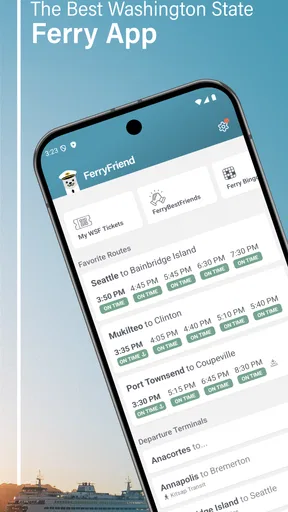
When I need to plan a ferry trip around Washington, I do not want to search through several pages while standing at a terminal or trying to coordinate a day away. FerryFriend is built for that exact travel problem: it puts Washington ferry schedules at the center of the experience and gives me a more focused starting point than a general travel app. After spending time with it, I see it as a practical companion for regular riders, occasional visitors, and anyone who wants to check a sailing without turning the task into a research project.
My recommendation depends on how you travel. If ferry timing is the main detail you need, this app makes sense because it stays focused. If you want a complete itinerary with hotels, restaurants, maps, flights, and alternative transport in one place, a broader travel service may suit you better. The important distinction is that FerryFriend is not trying to replace every travel tool. Its value comes from reducing the effort involved in one specific part of a Washington journey.
How I judged FerryFriend as a travel decision tool
I looked at the app through the questions I would ask before relying on it: Can I find a route quickly? Does it help with the difference between planning ahead and checking a trip at the last minute? Is it approachable for someone who rarely uses ferries? And does the focused design justify adding another app when general map and travel tools already exist?
FerryFriend is a free Travel & Local app from True Course LLC. It is rated for Everyone, which fits its straightforward purpose, and it runs on Android devices using version 7.0 or later. The current release is version 5.6.1. Those details matter because an older phone should not automatically rule it out, while newer-device owners can treat it as a lightweight specialist rather than a demanding all-purpose travel platform.
The app has an average rating of 4.7 from around 33 ratings, with 11 written reviews and over 10K installs. I would not treat those figures as proof that it is perfect, because the audience is still relatively small compared with major navigation services. Still, they suggest that the focused idea is connecting with people who specifically need Washington ferry schedules rather than a general-purpose travel feed.
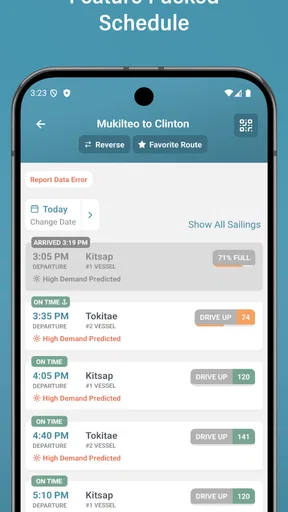
The first decision criterion is speed. A schedule app earns its place when it helps me answer a simple question quickly: which sailing should I consider? The second is clarity. Ferry travel involves more than choosing a destination; the timing of the sailing affects the whole day, especially when a missed departure creates a long wait. The third is repeat usefulness. An app I open only once has to be exceptionally convenient, while one I check for commuting, errands, or weekend trips can become part of my routine.
The everyday situation where the focused approach helps
Imagine I am leaving work and deciding whether to drive toward the terminal now or wait for a later sailing. A general map app may help with road directions, but it is not necessarily the first place I would look for a clean ferry-schedule check. FerryFriend gives that question its own home. I can use it before leaving, compare the timing with my expected arrival, and make a less rushed decision.
Worth Reading Before You Choose

Flipboard Shows What News Apps Must Do Beyond the Feed

Switching to Android Auto Means Rethinking Your Driving Routine

Google Calendar Makes a Crowded Week Easier to Manage

Ludo King Makes the Most of the Minutes Between Plans

Baby Panda World Brings Quick Play to Modern Phones, but Its Game Library Feels Busy

ESPN’s Live Game View Makes Following Close Games Easier
That workflow is useful even when I already know the route. Familiarity with a crossing does not remove the need to check the day’s schedule. In fact, regular riders may benefit most because a quick check can become a habit before every trip. I would open it while planning the morning, then check again before heading to the terminal if the timing is important.
There is also a useful difference between planning and navigation. I prefer to use FerryFriend to understand the sailing schedule, then use a map or traffic tool for the drive. Treating those as separate jobs is not a weakness; it is often clearer. The ferry schedule answers when the crossing may happen, while the map answers how long it may take to reach the terminal. Combining both checks gives me a more realistic departure plan than trusting either one alone.
Where FerryFriend is strongest
The biggest strength is focus. The app’s store summary is Washington Ferry Schedules, and that narrow purpose is exactly what makes it appealing. I do not have to wade through hotel suggestions, tourist content, flight results, or unrelated points of interest before thinking about the crossing itself. For a rider who already knows the broad trip and needs schedule information, that economy is valuable.
I also like the way a specialist app changes the mental task. Instead of asking a general search engine to understand a ferry question, I begin inside an environment designed around ferry travel. That can reduce the number of taps and the chance of overlooking the relevant schedule information. The benefit is especially noticeable when I am planning a trip with another person and need to make a decision together quickly.
The most useful habit is to check the sailing before building the rest of the day around it. I would not reserve a timed activity on the other side, promise a precise arrival time, or assume a convenient return without first reviewing the ferry schedule in FerryFriend. This simple order of operations prevents the common mistake of planning the road trip and destination first, then discovering that the crossing does not fit.
Another strength is its role as a dedicated reference during repeat travel. A commuter or frequent visitor does not need a long explanation of Washington or a complete vacation planner every time. A focused schedule app can be opened with a single purpose: confirm the next practical option. That makes it more useful than a broad travel app when the question is narrow and time-sensitive.
Three practical ways I would use it beyond a basic schedule check
First, I would use it as a decision checkpoint before committing to a route. If I am choosing between driving around and taking a ferry, the schedule is part of the route decision, not an afterthought. I can check whether the sailing pattern supports my intended departure, then compare that with the convenience of staying on the road.
Second, I would use it to coordinate a group without making everyone search independently. One person can check the ferry timing, another can estimate the drive to the terminal, and the group can agree on a meeting plan. This is a small workflow, but it avoids the confusion that comes from several people quoting different search results or relying on memory.
Third, I would use it to protect the return leg of a day trip. Travelers often focus on reaching the destination and leave the return until later. I prefer to check the return schedule before setting out, especially when the destination has a fixed closing time or when the group includes children, older travelers, or anyone who does not want an uncertain evening. FerryFriend is most valuable when it helps me think about the entire crossing cycle rather than only the outbound trip.
These uses reveal a trade-off: the app is strongest when I already have a specific ferry-related question. It is less compelling if I expect it to plan the whole experience automatically. That is not a criticism of its purpose; it is a reminder to choose the right tool for the job.
Where a broader alternative may fit better
I would choose a general map app when road traffic, turn-by-turn directions, walking routes, or several transport modes are the main concern. A map is better suited to answering how I get from my current location to a terminal and what happens after I arrive. FerryFriend can support the schedule side of that plan, but I would not expect one focused app to replace every navigation need.
I would choose a broad travel planner when I am arranging a complete holiday. If my decisions involve lodging, reservations, sightseeing, restaurant research, and multiple forms of transport, keeping everything in one planning environment may be more convenient. In that situation, FerryFriend can still serve as a schedule reference, but it may feel like one extra stop in the planning process.
I would also consider official information channels when a trip is unusually important or when I need the latest operational context surrounding a sailing. A schedule-focused app is useful for everyday planning, but I prefer to cross-check before a major event, a tight connection, or a journey where a disruption would be especially costly. This is a sensible travel habit with any schedule tool, not a reason to dismiss FerryFriend.
People who rarely travel by ferry may also prefer not to install a dedicated app. If I am making one isolated trip and already have a comfortable method for checking schedules, the additional app may not save enough effort to justify changing my routine. FerryFriend becomes easier to recommend when ferry travel is recurring, when the route is unfamiliar, or when schedule checks are central to the day.
What switching to FerryFriend actually involves
The cost of switching is not mainly financial because the app is free to download. The real cost is attention. I need to remember that schedule checking and road navigation are separate steps, decide where FerryFriend fits in my routine, and avoid assuming that installing it removes the need for sensible travel planning.
There are in-app purchases ranging from $2.99 to $599.99 per item, so I would pay attention to any purchase screen and make sure I understand what I am selecting before confirming anything. The free entry point makes it easy to try, but the presence of optional purchases means I would not tap through a purchase flow casually. For a schedule utility, I would first establish whether the free experience already covers my normal needs.
My switching workflow would be simple. I would install the app before a planned ferry day, use it to inspect the outbound and return timing, and compare those times with my driving estimate. I would then keep my existing map tool for the terminal approach. After a few trips, I would know whether FerryFriend saves me enough time to remain part of my regular travel setup.
One practical tip is to check the schedule at two different moments: once while planning and again before leaving. The first check helps shape the day; the second protects against relying on an old assumption. Another is to leave room between the estimated drive and the sailing rather than treating arrival at the terminal as something that can happen at the exact last minute. The app can inform the timing, but it cannot remove traffic, parking, queues, or the need to arrive prepared.
Who should use it, and who should skip it
I would recommend FerryFriend to Washington residents who use ferries regularly, visitors whose itinerary depends on a crossing, and families or groups that need a shared schedule reference. It is also a good fit for travelers who dislike digging through general search results for a narrow piece of information. The dedicated category makes sense when ferry timing affects where I go, when I leave, and whether I can comfortably return.
I would be more cautious recommending it to someone who wants a complete trip organizer. If the main goal is booking accommodation, finding attractions, navigating every leg, and keeping reservations together, a broader travel platform will probably be the better primary tool. I would also not rely on FerryFriend alone for a high-stakes connection without checking the latest relevant travel information through an appropriate official source.
People with older Android devices should note that the minimum operating system is Android 7.0. That is a relatively accessible requirement, but it is still worth checking before planning around the app. The Everyone age rating makes it suitable for general household use, including a family member who simply needs to look up a sailing without dealing with an advanced travel interface.
My final recommendation after weighing the trade-offs
FerryFriend earns a place in my travel toolkit because it treats Washington ferry schedules as the primary problem instead of burying them inside a larger travel experience. I appreciate that clarity. It helps me plan the crossing first, then use other tools for driving, reservations, and the rest of the day. That division makes sense and keeps the schedule question from getting lost.
I would start with the free version and test it on a real trip rather than judging it only from the store page. Check the outbound and return options, see how naturally it fits beside your map app, and decide whether it reduces the time you spend searching. If ferry travel is occasional and your current method already works, there may be little reason to change. If ferry timing repeatedly shapes your plans, the focused approach is much easier to justify.
Overall, I recommend FerryFriend to anyone who wants a dedicated Washington ferry schedule companion, with the understanding that it is a specialist rather than a universal travel planner. Its best quality is not a long list of extras; it is the way it gives one important travel decision a clear place in my routine. For the right rider, that focused convenience is enough to make it worth keeping installed.
Pros
- Quickly compares ferry routes
- schedules
- and available crossings.
- Useful booking details help travelers plan trips in one place.
- Route information can make unfamiliar ferry journeys easier to manage.
- Convenient for checking travel options before reaching the port.
- Helpful for comparing departure times when plans change.
Cons
- Route coverage may vary depending on country
- operator
- and destination.
- Schedules can change
- so verify important departures with the ferry operator.
- Some bookings may redirect you to an external provider or website.
- Ticket prices and availability may not always update immediately.
- Extra fees or operator-specific cancellation rules may apply at checkout.
FAQs for FerryFriend
What is FerryFriend and what can I use it for?
FerryFriend is designed to help travelers plan and manage ferry journeys in one place. Depending on the routes and operators supported in your region, you can use it to search connections, check departure times, compare available options, and review journey details before traveling. It is particularly useful for passengers who want a clearer overview of ferry schedules instead of checking several operator websites individually.
Does FerryFriend allow me to book and pay for ferry tickets?
FerryFriend may provide booking-related information or direct you to the relevant ferry operator, but the exact ticketing features can depend on the route, destination, and participating provider. Before relying on the app for a confirmed reservation, check whether the selected journey can be purchased directly inside FerryFriend or whether you will be redirected to an external booking page. Always verify the final ticket, payment, and cancellation terms with the operator.
Does FerryFriend provide live ferry updates and accurate schedules?
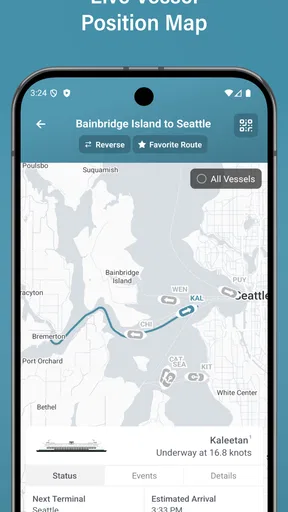
The app can be useful for checking planned departure and arrival information, but ferry schedules may change because of weather, technical problems, port restrictions, or operational decisions. Live tracking and disruption alerts may not be available for every route or operator. For an important trip, use FerryFriend as a convenient planning tool and confirm last-minute changes through the ferry company or port authority before leaving.
Which ferry routes and operators are supported by FerryFriend?
Coverage can vary considerably depending on your country, destination, and the ferry companies connected to the service. Some popular routes may offer detailed schedules and booking options, while smaller or regional services may have limited information or no current results. After installing FerryFriend, search for your intended departure and arrival ports to confirm that the route is supported before making travel plans based solely on the app.
Is FerryFriend free, and what permissions or internet access does it require?
FerryFriend may be available to download without an upfront charge, although certain booking services, operator fares, or optional features can involve separate costs. An internet connection is normally required to load schedules, refresh travel information, and access booking pages. If the app offers notifications or location-based features, it may request permissions for alerts or location access; review these permissions and enable only those you find useful.


